Track every calorie, macro and vitamin, free for ever. Everything else free for 15 days, then just ₹1 a day.
Your health comes first. Start with today.
A vegetarian food, exercise and recovery tracker. Log what you eat and what you do: it works out the calories, protein, vitamins and minerals, and how each muscle recovers, and shows how every number was found.
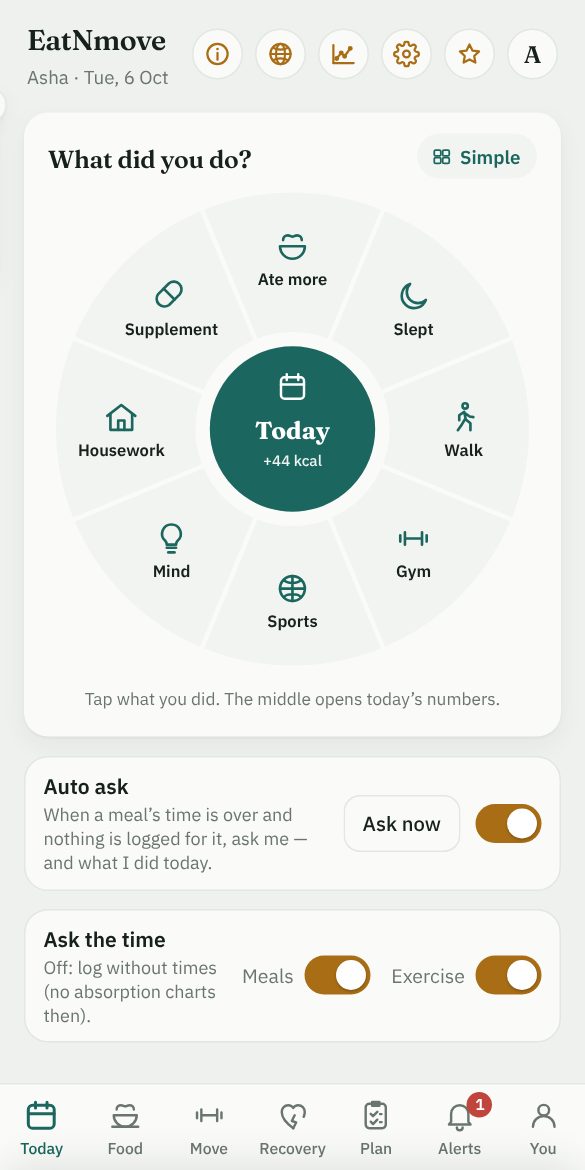
Log what you ate and what you did. EatNmove does the arithmetic, and shows it.
Your whole day on one screen
What you ate against what you burned, as the day goes, and what the difference means for fat and muscle.
Calories, protein, carbs and fat for the day so far
Walking, the gym, sports, sleep, study and housework all counted
Tap any figure to see how it was worked out
Made for Indian vegetarian meals
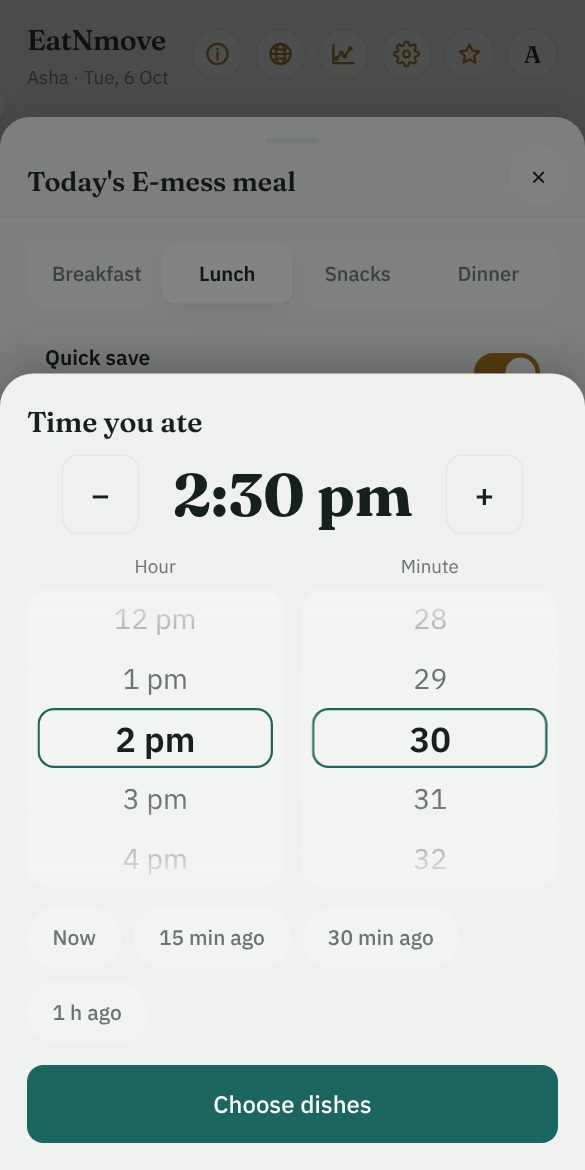
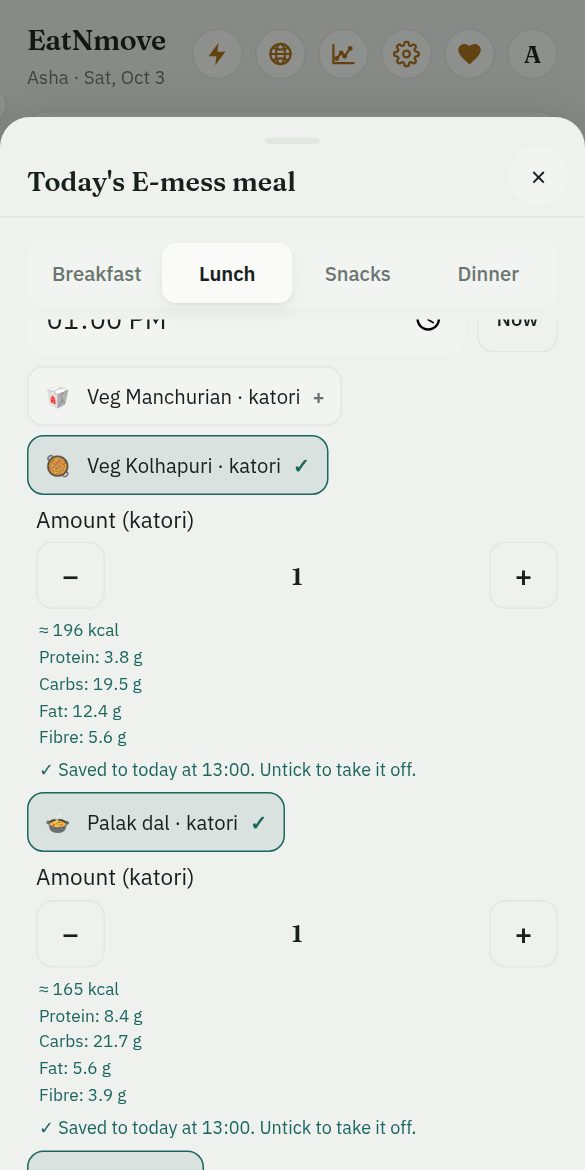
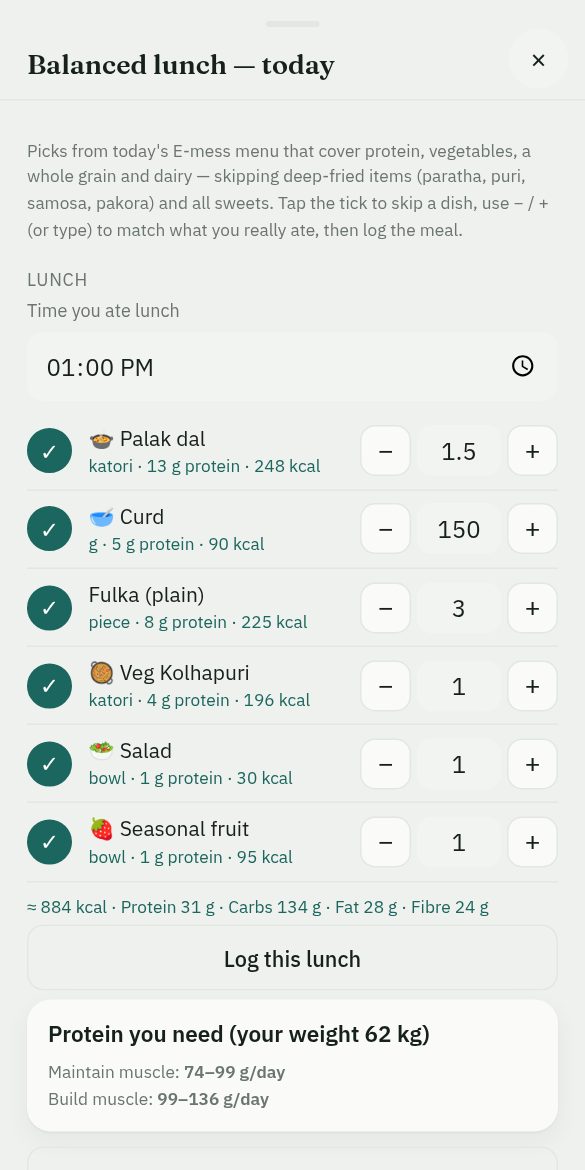
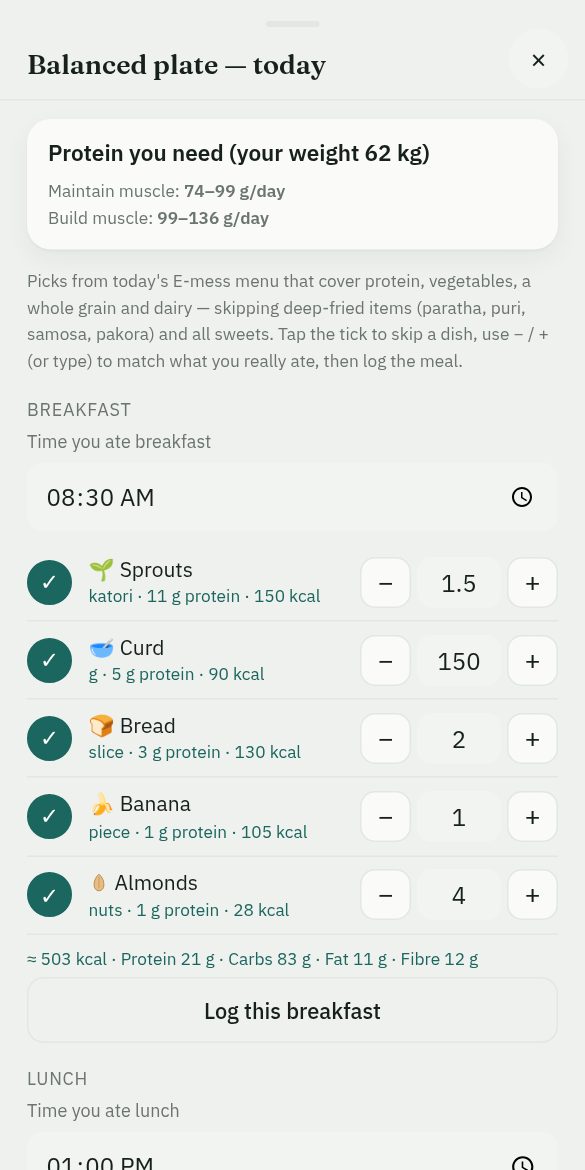
Set the time of the meal, then tick what you ate from the day’s menu: your mess’s, or one you make for your own week.
The A, D and E mess menus at IISc are already in
12 vitamins and 11 minerals against ICMR-NIN 2020 targets
A balanced plate suggested for every meal
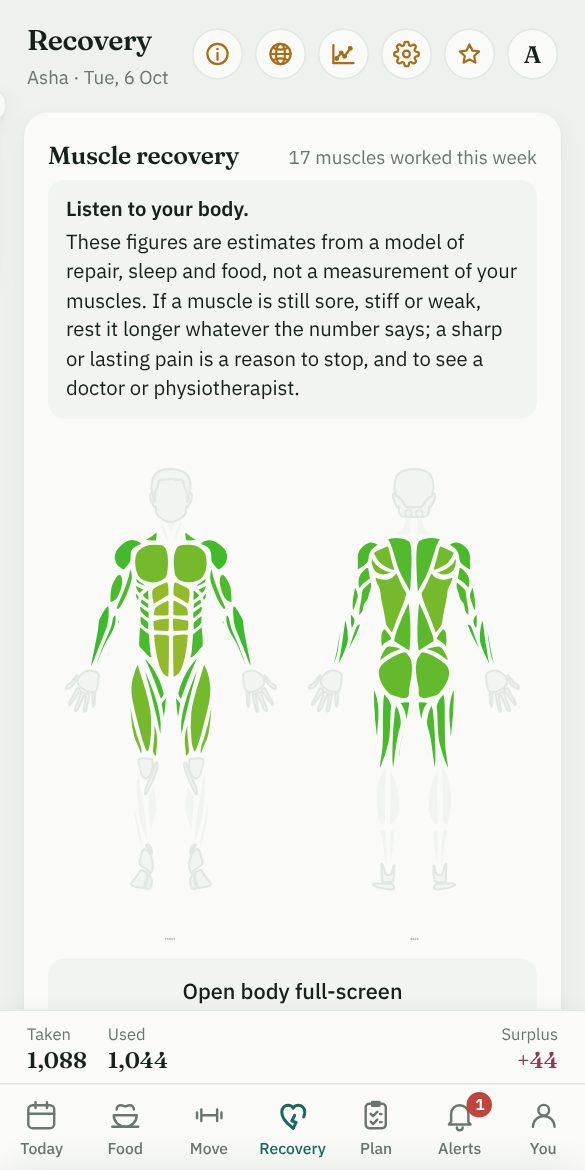
Recovery, muscle by muscle
Every set you log is counted against the muscles it works. Training, sleep and food decide how fast each one recovers.
The body, front and back, coloured by recovery
The time until each muscle is ready again
Calories for lifting from the movement, your height and your weight
What you get
Tap any of these to see it in the app.
Track
Your day on one screen: what you ate against what you burned, and what that means for fat and muscle.
Fuel
Food logging built on Indian vegetarian food, with your mess menu or a menu you make for your own week, and a balanced plate for each meal.
Nutrients
Protein, carbs, fat and fibre for every food, and 12 vitamins and 11 minerals set against ICMR-NIN 2020 targets, so you can see what your food is short of.
Figures
Every food’s calories, protein, carbs, fat, fibre, vitamins and minerals in one table, and every exercise’s calories at your weight, behind the ⓘ at the top of the app. Change any figure for a profile and the whole app works from yours, add foods and exercises of your own, each with a picture, and restore the app’s own figures at any time, one or all. On a phone each figure is set on two wheels, without the keyboard. Your figures are kept with your account.
Move
Calories for lifting, holds and conditioning worked out from the movement, your height and your weight.
Favourites
Keep a list of the exercises you actually do — a set of resistance bands at home, your usual machines at the gym — and Exercised offers it first, as pictures: tap the ones you did today, then a box for the reps and the weight or band of each.
Recover
Muscle-by-muscle recovery, driven by training, sleep and food. And for each sport you play, how many minutes are left this week and how hard to go today, with each week kept to about 10% more than the last, to keep clear of injury.
Plan
Choose to build muscle while losing fat, keep muscle while losing fat, or bulk. The plan sets your calories, protein, fat and carbs for the day, gives you a training week for the gym or for home, as full body, upper / lower, or push, pull, legs + core (today’s workout logged in one tap, and raised by no more than about 10% a week), and makes today’s plates from your mess menu or your own, sized to the plan. Every figure is linked to the research behind it.
Grow
Your training and your month plotted. Every method names where it comes from, with links to the research.
Remember
Say what you studied today and the app reminds you to recall it: the next day, on day 3, after a week, and then at widening gaps. Each reminder says how to recall it, and why.
How you feel
Each morning and night, a few words for how you feel, drawn over the weeks. When hard feelings keep coming back, it says so, and finds help near you: free helplines, psychiatrists, psychologists and health centres, with their phone numbers.
Family
As many profiles as you need. One account can follow every member of the family, each with their own food, training and recovery.
Sync
Keep your phone and your computer in step if you want to, locked with a passphrase that only you know.
Studying for something? It reminds you when to recall
What is read once fades quickly. Recalling it with the notes closed, at widening intervals, is what the research on memory supports best — so EatNmove keeps track of when, and you do the recalling.
Say what you studied. Under Memory on the Today tab, type the topic — “the Krebs cycle” — and add it. That is all it needs.
It reminds you when it is due. The next day, then on day 3, 7, 14, 30, 60 and 120, at the time of day you choose. Turn notifications on and your phone or computer tells you even when the app is closed.
Recall first, then check. Close the notes and bring it back from memory — on a blank page, with your own questions, by teaching it aloud — then open them and fix what you missed. Each reminder says which way to try, and why.
A hard recall comes back sooner. Say how it went: one that went badly returns tomorrow, one that went well waits longer. Give a test date and the recalls stay on the near side of it.
On recalling and spacing: Roediger & Karpicke (2006), Cepeda et al. (2006) and Dunlosky et al. (2013); the app links more with each recall. No experiment shows these exact days to be the best ones: they follow what the experiments agree on. On an iPhone, notifications work for the copy of EatNmove on your Home Screen.
Eat at a hostel or institute mess?
EatNmove is built for mess food too. For the A, D and E messes at IISc the day’s menu is already in the app. You tick what you ate, set the amounts, and the meal is logged.
Make your own menu for the week. At an IIT, NIT, IISER or any other hostel mess, or eating at home, you enter your weekly menu once in the app — your mess’s, or your own routine. From then on, when you log a meal you choose from that menu only.
A balanced plate for every meal. From that day’s menu — the mess’s, or the one you made — the app picks a plate that covers protein, vegetables, a whole grain and dairy, and leaves out the deep-fried dishes and the sweets. Skip a dish or change an amount, then log the meal straight from the plate.
Want it for your institution? Send the name of your institution and its vegetarian mess menu — a photo or a PDF of the weekly sheet is enough — and it will be added, so that entering your meals is as easy there.
One of the best app for tracking daily calories and activities! You can easily log your food, walking, running, workouts, and other activities, and it gives you a clear idea of your calorie intake, calories burned, and overall calorie balance. The wide range of food and exercise options makes tracking very convenient. Definitely a great app for anyone who wants to keep track of their daily health and fitness.
Ankit Rao · Free trial · 8 October 2026
★★★★★
Amazing app for overall health benifits. Backed by data and science.
Dr. Vivek · Free trial · 8 October 2026
★★★★★
This is a really well-designed app for tracking daily calories, nutrients, exercise, and recovery. The interface is clean, modern, and easy to navigate. I especially like how it combines food intake, calorie expenditure, workouts, and muscle recovery in one place.
Prateek Rao · Free trial · 8 October 2026
Only people who use EatNmove can write a review: those who have paid, those on the free trial and those given free access, each review marked with which. One each, which its writer can change or delete at any time. A review with vulgar or abusive words, in English or Hindi, cannot be published. Every review is shown as it was written, newest first. One that is abusive, advertises something or gives away someone’s personal details is taken down; nothing else is.
When your body feels well, most things get easier: work, study, sleep, mood. Everything else you want stands on it.
Your family lives easier
A healthy you has energy for the people at home, and gives them less to worry about. One subscription holds a profile for each of them, so you can look after everyone’s progress.
A fitter body, a calmer mind
Regular activity reduces the symptoms of depression and anxiety and is good for the brain. What you eat and how you sleep count too.
Consistency does the work
No single day changes much; what you do on most days does. Seeing each day written down, and how the weeks add up, is what keeps you at it.
Time does not wait
Everyone ages; how well is partly in your hands. Eating well and staying active through life help keep body and mind capable for longer. The best day to begin is today.
Strong people, strong nation
A country is as healthy as its people. A fit and strong India is built one person at a time. Start with yourself.
Every number shows its working
Nothing here is a black box. Tap a figure or a chart and the app shows how it was worked out, step by step, with your own numbers in it, and links to the research papers the method rests on. You can check it, and you can learn from it.
On activity, mood and ageing: the World Health Organization’s fact sheets on physical activity and ageing and health. EatNmove gives estimates and is not medical advice.
How it works
Sign in with Google. There is no new password to make.
Everything is free for your first 15 days, with no card. After that, food, with its calories, macros, vitamins and minerals stays free for ever.
For everything else — exercise, plans, recovery, fat and muscle, Memory’s reminders, supplements, glucose and insulin, sync — it is ₹30 a month, by a UPI or card mandate you approve on Razorpay (Razorpay takes ₹5 to check it and refunds it automatically). Cancel at any time.
Install the app, then sign in
Install EatNmove on this phone or computer.
Open it from your home screen or your list of apps.
Sign in with Google there, and start.
Use your browser’s Install or Add to Home Screen: in its menu, or on an iPhone under the Share button.
Show me how, with pictures
1 In Safari, tap the Share button (at the bottom; on an iPad, at the top).2 Scroll the list down a little and tap Add to Home Screen.3 Tap Add. EatNmove is on your Home Screen: open it from there and sign in.
1 In Chrome, tap the menu ⋮ at the top right.2 Tap Install app (on some phones: Add to Home screen).3 Tap Install. Open EatNmove from your home screen or app list, and sign in.
1 In Chrome or Edge, click the install icon at the right end of the address bar (or the menu: Install EatNmove).2 Click Install.3 EatNmove opens in its own window, and is in your Start menu, Dock or app list. Sign in there. (Safari on a Mac: File > Add to Dock.)
Installed. Open EatNmove from your home screen or your list of apps, and sign in there.
Or sign in below and use it in the browser.
Food free for ever. Everything free for 15 days, then ₹30 a month.
That is about ₹1 a day: the least you can do for your health. The rupee is only a reminder that your health comes first.
One subscription, the whole family. Add a profile for each person at home and follow everyone’s food, training and progress from one account, for the same ₹1 a day.
Sign in with Google to start or to continue. You can cancel at any time.
Everything free for 15 days, with no card. Food tracking stays free after that.
When you approve the mandate, Razorpay takes ₹5 to check your UPI or card, and refunds that ₹5 automatically.
Card and UPI details are entered only on Razorpay. This site never sees them.
Questions
Where is what I log kept?
What you log stays in your browser on your device, unless you turn on sync yourself, and that you can lock with a passphrase so that only your devices can read it. The exceptions are Memory, whose topics are also kept on the server so that it can remind you (encrypted with that passphrase if you have set one), and any food or exercise figures you change for a profile, which are kept with your account. Signing in only tells us which Google account has a subscription.
What does it cost?
Tracking food, with its calories, macros, vitamins and minerals is free. Everything else is free for your first 15 days too; after that it is ₹30 a month, by a UPI Autopay or card mandate that you approve on Razorpay. One subscription covers a profile for each person at home. When you approve the mandate, Razorpay takes ₹5 to check your UPI or card and refunds that ₹5 automatically.
How do I cancel?
From your Account page, or by revoking the mandate in your UPI or bank app. No further payment is taken, and the free food plan stays. Cancel before the first charge and you are not charged at all; cancel after a monthly payment and you keep access until the end of the month you paid for. See Refunds and cancellation.
Does it work without the internet?
Yes. Once it has been opened, the app keeps working with no connection for up to 7 days at a time, and what you log stays on your device. Sync, Memory’s reminders and your account need the internet.
Can my family use it?
Yes. Add a profile for each person at home: each has their own food, training and recovery, and one account follows them all, for the one subscription.
Is it medical advice?
No. Every number is an estimate from published formulas and food tables, with its working shown. It is not medical, dietary or training advice; if you are pregnant, under 18, unwell or managing a condition, please ask a doctor or a qualified dietitian first.